Distribution & Trading

Distribution & Trading ERP Implementation built for how wholesalers actually operate

Distributors run on thin margins and thick complexity. Every handoff between purchasing, warehousing, credit control and finance is a place a disconnected system quietly costs money. Rivira Systems has spent over two decades replacing that patchwork with one ERP, configured for real use.

Distribution & Trading ERP Implementation
✦ What it is

What is Distribution & Trading
ERP Implementation?

It is the end-to-end setup of an ERP for wholesale, import-export and B2B operations. Purchasing, inventory, sales, shipping, invoicing, payments and replenishment share one source of truth across SKUs, vendors and customers.

Distribution and Trading ERP Implementation Partner

The work a partner is hired to do

Configure the system to real vendor terms, real warehouse layouts and real customer credit rules. A license does not do that on its own.
ERP Procurement and Vendor Management

Procurement

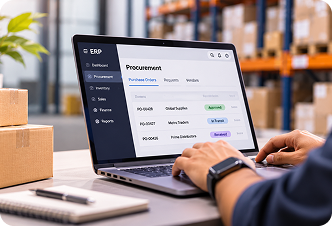
Vendor management, purchase orders and landed cost, so what was ordered is what gets paid.

ERP Warehouse and Inventory Management

Warehouse

Bins, lots, put-away, picking and cycle counts, with stock that matches the floor.

ERP Order to Cash Management

Order to cash

Quote, credit, price, invoice and collection in one sales order automation cycle.

ERP Order to Cash Management

Finance

Reconciliation, multi-entity accounting and margin you can see while the month is still open.

WHY GENERIC ROLLOUTS FAIL

A Default Setup Ignores How A Trading Business Actually Runs

Installation is not implementation. These are the costs that show up when the system is never matched to the work.

Common Challenge What Happens Without Proper Implementation
Complex vendor and customer pricing Tiered prices, rebates and contract terms are ignored, so margins are miscalculated.
Legacy data from old systems A weak migration leaves duplicate SKUs, stale stock counts and orphaned customer records.
Multi-location warehousing Stock looks available when it is already committed in another warehouse.
No dedicated procurement workflow Purchase orders stay manual, so reorder timing and vendor terms get missed.
Unclear cost or scope The budget overruns, or the system cannot do what the business needed.
No forecasting discipline Demand planning stays in a spreadsheet, and overstock and stockouts arrive together.
WHY RIVIRA

Growing Distributors Choose A Full-Cycle Implementation, Not A License

Rivira consultants know warehouse, finance, procurement and vendor operations. The ERP is configured around your workflows, inventory and growth, not a generic template.

Roadmap planning so scope follows business priorities.

Fit-gap across procurement, warehouse, sales and finance before a screen is configured.

Migration that keeps vendor history, credit terms and the item master accurate.

Testing built around your order-to-cash and procure-to-pay cycles.

Role-based training so warehouse, sales and finance adopt it from week one.

Managed support after go-live, with optimization as you scale.

Business professional working in a modern office
FUNCTIONAL COVERAGE

Nine Areas One Distribution ERP Has To Cover

Wholesale, import-export and B2B trading need these working together, not as separate tools.

Financial Management

Financial Management

Multi-entity ledgers, costing, reconciliation and consolidated reporting.

Procurement

Procurement

Vendor management, purchase orders, requisitions and 3-way matching.

Warehouse and Inventory

Warehouse & inventory

Multi-location WMS, bins, lots, live stock and cycle counts.

Sales Order

Sales Order

Quote-to-order, credit limits and customer pricing agreements.

Order to Cash

Order to cash

Invoicing, collections and the path from order to cash collected.

Demand Planning

Demand Planning

Forecasts, reorder points, safety stock and seasonal patterns.

Process Automation

Process automation

Approvals, exception alerts and document routing across teams.

Reporting and Copilot

Reporting & Copilot

Dashboards, Power BI and natural-language questions on live ERP data.

Compliance

Compliance

Tax, e-invoicing and statutory reporting for each region you trade in.

Module by module Distribution & Trading ERP Implementation icon MODULE BY MODULE

What A Rivira Distribution ERP Implementation Delivers

Seven workstreams. Each one is configured to the way the business buys, stores, sells and closes.

Financial reconciliation & multi-entity finance

Companies across entities, currencies or branches need a close that finishes in days. Ledgers, bank reconciliation, landed cost and audit trails are set so finance trusts the numbers without a side spreadsheet.


Tick icon: automated bank and vendor statement reconciliation in Distribution & Trading ERP Implementation
Automated bank and vendor statement reconciliation
Tick icon: multi-entity and multi-currency consolidation
Multi-entity and multi-currency consolidation
Tick icon: landed cost across freight, duty and insurance
Landed cost across freight, duty and insurance
Tick icon: margin by item, customer and vendor
Margin by item, customer and vendor
ERP financial dashboard and business professional
Purchase order management ERP dashboard

Purchase order management & procurement

Margins are won or lost on the purchase order. Requisitions, vendor pricing and receiving tie into inventory and payables, so ordered, received and paid stay on one line.

Tick icon: requisitions and purchase planning in Distribution & Trading ERP Implementation
Requisitions and purchase planning tied to forecasts
Tick icon: 3-way match of order, receipt and vendor invoice
3-way match of order, receipt and vendor invoice
Tick icon: vendor scorecards, price agreements and approvals
Vendor scorecards, price agreements and approvals
Tick icon: drop-ship and direct-to-customer routing
Drop-ship and direct-to-customer routing

Warehouse management & live inventory

Inventory accuracy is the difference between a promise you can keep and a stockout you apologize for. Every location tracks stock to the bin, lot or serial number.


Tick icon: multi-location and multi-bin warehouse structures in Distribution & Trading ERP Implementation
Multi-location and multi-bin structures
Tick icon: directed put-away and pick paths
Directed put-away and pick paths
Tick icon: lot, batch and serial tracking for recalls
Lot, batch and serial tracking for recalls
Tick icon: cycle counts and physical inventory reconciliation
Cycle counts and physical inventory reconciliation
Warehouse inventory and ERP analytics dashboard
Sales order automation ERP dashboard

Sales order automation & order-to-cash

Manual order entry is high cost and low value. Quotes and orders pull price, credit and availability, then carry that data through invoicing and collections.

Tick icon: EDI, e-commerce and portal order capture in Distribution & Trading ERP Implementation
EDI, e-commerce and portal order capture
Tick icon: credit limit and price checks at order entry
Credit limit and price checks at order entry
Tick icon: invoicing, dunning and collections
Invoicing, dunning and collections
Customer-facing order status dashboard in Distribution & Trading ERP Implementation
Customer-facing order status

Demand Planning And Forecasting

Overstock ties up cash. Stockouts lose customers. Reorder points follow how the business actually sells, using history, seasonality and lead times.

Tick icon: statistical and AI-assisted forecasts
Statistical and AI-assisted forecasts
Tick icon: safety stock and reorder points by item and location in Distribution & Trading ERP Implementation
Safety stock and reorder points by item and location
Tick icon: seasonal and promotional demand
Seasonal and promotional demand
Tick icon: forecast-to-purchase-plan automation
Forecast-to-purchase-plan automation
Demand planning and forecasting dashboard
Business process automation dashboard

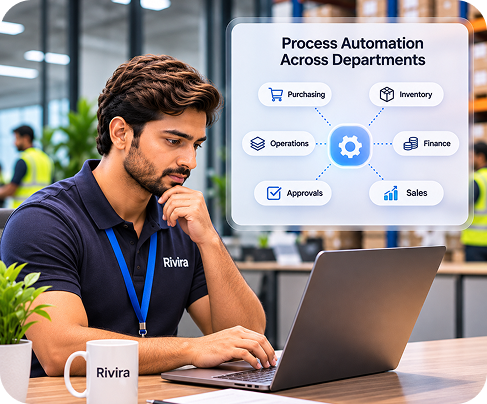
Process automation across departments

Approvals, alerts and document routing keep discounts, credit holds and purchase approvals inside the system, with an audit trail, instead of in email.

Tick icon: approvals for purchasing, discounts and credit holds in Distribution & Trading ERP Implementation
Approvals for purchasing, discounts and credit holds
Tick icon: alerts for late shipments or margin erosion
Alerts for late shipments or margin erosion
Tick icon: document and email routing tied to status
Document and email routing tied to status
Tick icon: Power Automate and Teams for approvals
Power Automate and Teams for approvals

Reporting, analytics & Copilot

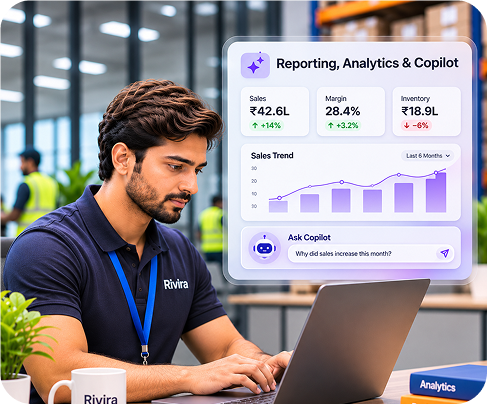
Leaders need answers in minutes, not at month end. Power BI and Copilot give operations and finance plain-language access to inventory, sales and margin.
Tick icon: Power BI by branch, item and customer in Distribution & Trading ERP Implementation
Power BI by branch, item and customer
Tick icon: Copilot questions against live ERP data
Copilot questions against live ERP data
Tick icon: anomaly checks on margin, stock and cash
Anomaly checks on margin, stock and cash
Tick icon: refreshable Excel for finance
Refreshable Excel for finance
ERP reporting analytics and Copilot dashboard
CHOOSING A PARTNER

How To Choose The Right ERP Implementation Partner

The strongest predictor of success is the partner running the project, not the software. For a trading business, look for a team that can show the work.

  • ✓ Direct experience with distribution or wholesale ERP, not only generic accounting projects.
  • ✓ A named method with milestones, not an open-ended statement of work.
  • ✓ References from businesses of similar size, warehouse footprint and transaction volume.
  • ✓ A clear plan for data migration, not a promise that “data will move over.”

What Rivira brings to that list

  • ✓ Over 25 years of ERP delivery, more than 300 completed projects, and a six-phase method that treats migration as its own workstream. The team works from the warehouse floor through to the finance close.
  • ✓ The team works from the warehouse floor through to the finance close.

Partner with Rivira for a clear, modular pricing plan based on your actual requirements.

Request Custom Quote
DELIVERY METHOD

Six phases, whether you run one warehouse or twelve

Business outcomes that reduce costs, improve performance,
and prepare your infrastructure for future growth.

1

Discovery

Procurement, warehouse, sales and finance workflows, current systems and the reports people actually use.

2

Design

Requirements mapped to ERP capability, gaps named, and any customization scoped before build.

3

Build

Configuration, integrations and migration preparation, using the design as the contract.

4

Testing

User acceptance, data validation and performance across procurement, WMS and sales order flows.

5

Go-live

A controlled cutover with parallel-run support and live issue monitoring.

6

Optimize & support

Post-go-live support, training follow-through and continuous improvement as volume grows.

INDUSTRIES

Industries We Serve

The same method, configured for the way each trading model buys, stores and sells.

Wholesale Distribution

Wholesale Distribution

Import and Export Trading

Import & Export Trading

Retail Supply and Fulfillment

Retail Supply & Fulfillment

Manufacturing

Manufacturing-Adjacent
Distribution

Food and Beverage

Food & Beverage
Distribution

Industrial and Building Materials

Industrial & Building
Materials

FROM THE FIELD

Three Places Distribution Projects Usually Slip

generic rollout loses margi

Where a generic rollout loses margin

Tiered pricing, rebates and contract terms never make it into a default setup.

See the failure points

Migration is a workstream

Migration is a workstream, not a weekend

Clean the item master, then prove the new system against the old one.

How migration is run

One method, one warehouse or twelve

One method, one warehouse or twelve

Discovery through support. The phases stay fixed. The scope follows the footprint.

Read the six phases
FAQ

Frequently Asked Questions

Cloud migration to Azure doesn't have a set cost. If a provider gives a flat price without checking your environment, be cautious. Actual azure migration services cost depends on key factors:

Expert guidance to plan, implement, migrate and manage Microsoft Fabric - including Power BI - turning raw, scattered data into insights you can actually act on.

Power BI is the reporting and visualization layer. Microsoft Fabric is the full platform underneath it - data integration, engineering, warehousing, real-time analytics and Power BI - all built on a single OneLake foundation.

It avoids common implementation and migration mistakes, speeds up deployment and gets significantly more ROI from your Microsoft Fabric and Power BI investment than a self-managed, trial-and-error rollout.

Data integration, OneLake architecture, data modeling, warehouse and pipeline build, Power BI report development, testing, deployment and user training - the full path from raw data to a working, adopted system.

Microsoft Fabric Implementation Cost depends on complexity, data volume, migration scope and ongoing support - typically ranging from a few thousand dollars for a focused Power BI project to enterprise-scale investment for larger Fabric rollouts. We provide a clear quote after a free consultation.
Get Started

Get started with
Rivira Systems

New to distribution ERP, or fixing a rollout that never quite landed? You get a clear roadmap, so the project moves with clarity. Over 25 years, 300+ projects, and a team that knows wholesale from the floor to the close.

  • ✓ Discovery before configuration
  • ✓ Migration treated as its own workstream
  • ✓ Support that stays after go-live

Tell Us About The Rollout